GLSL - Vertex and Fragment Shaders
The two programmable stages of the rendering pipeline and the division of labour between them.
The GPU gives you two places to run your own code. A vertex shader decides where a point ends up on screen. A fragment shader decides what colour a pixel is. Between them sits the rasteriser, which you do not control.
Where This Fits
The GLSL layer — the two programmable stages and what belongs in each. Engine-agnostic, though the matrices in the examples are ones a rendering engine supplies ready-made.
Assumes Shaders and the GPU. Pairs with Attributes, Uniforms and Varyings, which describes the same machinery from the data end.
The Division of Labour
| Vertex shader | Fragment shader | |
|---|---|---|
| Runs once per | Vertex | Pixel covered by a face |
| Question it answers | Where does this point land? | What colour is this pixel? |
| Typical invocations per frame | Hundreds to thousands | Hundreds of thousands to millions |
| Writes to | gl_Position | gl_FragColor |
The invocation counts are the practical difference. A sphere at 64×32 segments has about 2,000 vertices; filling it across a 1000px viewport on a 2× display covers something near a million fragments. Work moved into the vertex shader gets done hundreds of times less often, so compute there whatever survives being interpolated.
The Vertex Shader
The vertex shader receives one vertex and must write a clip-space position to gl_Position:
void main () {
  gl_Position = projectionMatrix * modelViewMatrix * vec4(position, 1.0);
}
That is the minimum viable vertex shader — it carries the local-space position through the stages described in 3D Transformations. position is a vec3 padded to vec4(position, 1.0); the fourth component distinguishes a point, which translation should move, from a direction, which it should not.
Nothing forces you to pass position through unchanged. Displace it and the geometry deforms:
#pragma glslify: noise = require('glsl-noise/simplex/3d')
varying float vAmount;

void main () {
  float n = noise(position * 1.6);
  vAmount = n;
  vec3 displaced = position + normal * n * 0.28;
  gl_Position = projectionMatrix * modelViewMatrix * vec4(displaced, 1.0);
}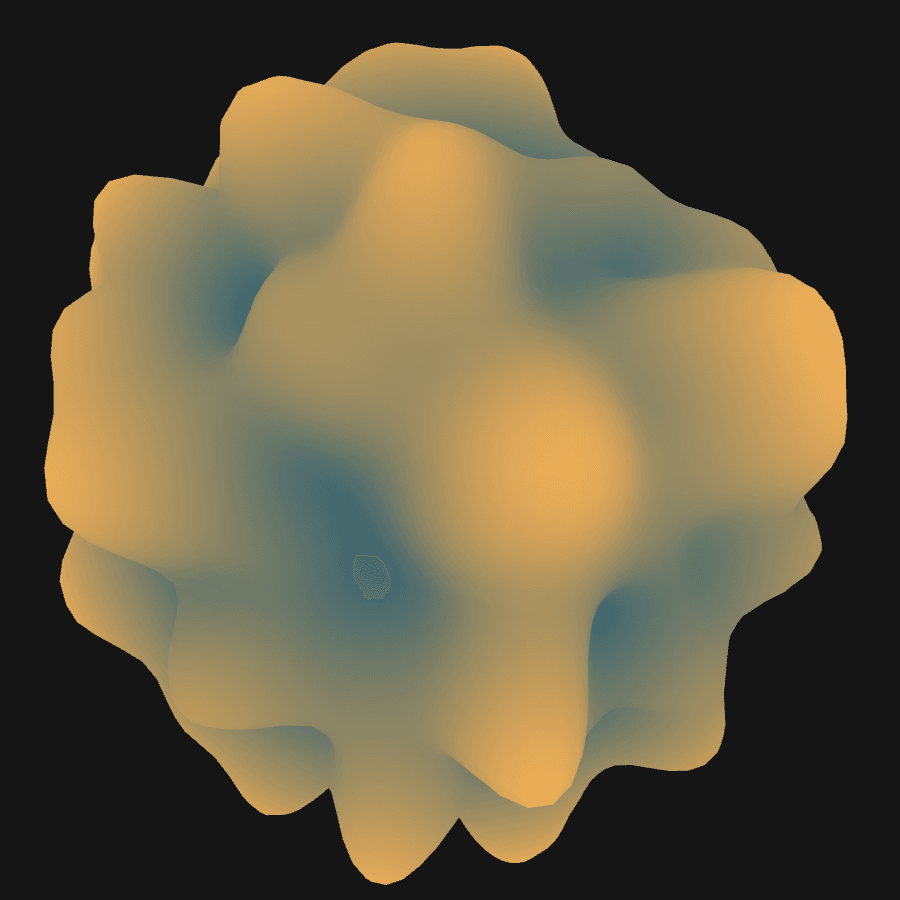
That is a plain sphere geometry. Each vertex was pushed along its own normal by a noise value sampled at its position, and the noise amount was passed to the fragment shader as a varying to colour the peaks. The vertex data on the GPU still describes an untouched sphere — only this frame’s interpretation of it moved.
Rasterisation
Between the two shaders, the GPU works out which pixels each triangle covers. Each becomes a fragment: a candidate contribution to the image, carrying interpolated values from the three vertices of its triangle.
Fragment rather than pixel because it might not survive — it can be hidden behind something nearer the camera, discarded by the shader, or blended with what is already there.
This stage is fixed-function. It matters because interpolation happens here, which is what makes varyings work.
The Fragment Shader
The fragment shader writes a colour to gl_FragColor, a vec4 of red, green, blue and alpha with each channel from 0.0 to 1.0.
void main () {
  gl_FragColor = vec4(1.0, 0.0, 0.0, 1.0);  // opaque red
}
That paints every fragment identically. To vary across a surface, the shader needs to know where on the surface it is — and it cannot work that out alone. A fragment shader knows nothing about the geometry, the scene, or the other fragments. It knows only the values handed to it.
Which is what varyings are for:
varying vec2 vUv;

void main () {
  gl_FragColor = vec4(vUv.x, vUv.y, 0.0, 1.0);
}
vUv differs for every fragment, so red tracks the coordinate wrapping around the sphere and green tracks it from pole to pole. Every fragment shader that is not a flat colour works this way: take an interpolated coordinate, put it through some maths, output a colour.
Working Together
The two shaders are written as a pair sharing a set of varyings. The common starting point is a vertex shader that transforms the position and forwards its attributes untouched:
varying vec2 vUv;
varying vec3 vNormal;

void main () {
  vUv = uv;
  vNormal = normal;
  gl_Position = projectionMatrix * modelViewMatrix * vec4(position, 1.0);
}
This is a pass-through vertex shader. A great deal of shader work starts from exactly it, with all the behaviour in the fragment shader.
See Also
- Attributes, Uniforms and Varyings — the three ways data reaches these programs
- Shaders and the GPU — why shader code is shaped like this
- 3D Transformations — what the matrices in
gl_Positionare doing
Resources
- What is a shader? — The Book of Shaders on the execution model
- ShaderMaterial — supplying both programs to a rendering engine
Source: WebGL & GLSL — A Primer by Matt DesLauriers, and its code snippets guide