Rendering Engines - 3D Transformations
Position, rotation and scale, why they are relative to a parent, and the journey from local space to the screen.
A transformation moves an object without changing its geometry. The vertex data stays exactly as it was; what changes is where those vertices are interpreted as being.
Where This Fits
The rendering engine layer, with one foot in GLSL — the matrices at the end of this note are what these properties become by the time a shader sees them.
Assumes The Scene Graph. Connects to Vertex and Fragment Shaders.
The Three Transforms
| Transform | What it does | Units |
|---|---|---|
| Position | Translates along X, Y and Z | Scene units |
| Rotation | Turns about the X, Y and Z axes | Radians |
| Scale | Stretches along X, Y and Z | Multipliers, 1 is unchanged |
Position and scale are triples read one value per axis. Scale is multiplicative, so 1 leaves the object alone and 0 collapses it.
Rotation has the trap. Values are in radians, not degrees — a full turn is , a right angle . Setting a rotation to 90 expecting a right angle gives roughly fourteen revolutions.
Rotations also do not commute: X then Y lands somewhere different from Y then X. The order is part of the rotation’s definition, and engines expose it as a setting.
Everything Is Relative to a Parent
Transforms are measured against whatever the object is attached to, not against the world. This is what makes the scene graph a tree.
Scene
└── Car          position (10, 0, 0), rotation (0, π/4, 0)
    ├── Body     position (0, 0, 0)
    ├── Wheel A  position (1, 0, 1)     ← relative to Car, not the scene
    └── Wheel B  position (-1, 0, 1)
Grouping is the practical form. Four cubes positioned inside a group, then one rotation applied to the group itself:
const group = new THREE.Group();

[[-0.6, 0.6], [0.6, 0.6], [-0.6, -0.6], [0.6, -0.6]].forEach(([x, y]) => {
  const cube = new THREE.Mesh(geometry, material);
  cube.position.set(x, y, 0);
  group.add(cube);
});

group.rotation.set(0.6, 0.8, 0.4);   // one rotation, on the parent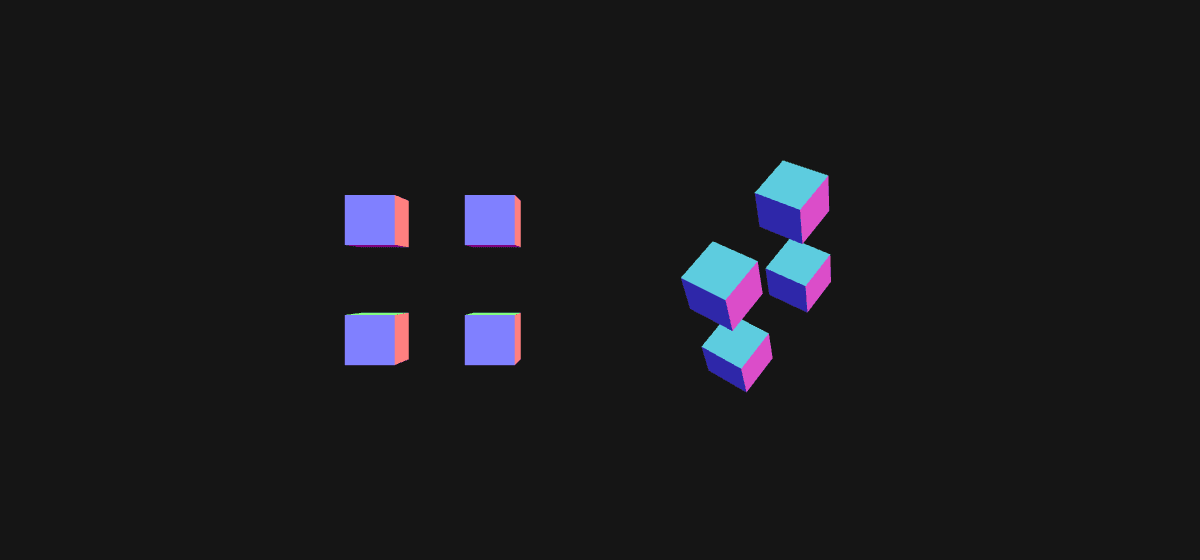
Left is the group untouched, right the same group after that single rotation. No cube’s own transform changed — each still sits at its own corner, relative to the parent that moved. The alternative is recalculating every child’s world position by hand each time the assembly moves.
Local Space to Screen Space
A vertex starts in local space, relative to its own geometry’s origin. Getting to a pixel is three steps.
Model applies the object’s own transform chain, walking up through every parent, putting the vertex in world space. View re-expresses that world position relative to the camera, so the camera becomes the origin. Projection flattens the result onto a 2D plane, applying perspective if the camera has it.
Each step is a matrix, and applying one is a multiplication. This is why the standard closing line of a vertex shader reads as it does — the three stages composed right to left:
gl_Position = projectionMatrix * modelViewMatrix * vec4(position, 1.0);position is the local-space vertex. modelViewMatrix combines the model and view stages, since they are always applied together. The engine computed both matrices before the shader ran; the line is a journey from the object’s own frame of reference out to the screen’s.
See Also
- The Scene Graph — the tree these transforms are inherited through
- Vertex and Fragment Shaders — where the matrices are applied
- Coordinates and Geometry — the local-space coordinates being transformed
Resources
- Object3D — position, rotation and scale on every three.js object
- Euler — how rotation order is expressed
Source: WebGL & GLSL — A Primer by Matt DesLauriers