GLSL - Waves and Noise
Sine waves and noise functions as sources of smooth variation, and why an extra dimension gives you animation.
Most generative work comes down to varying something smoothly across space or time. Wave functions and noise functions are the two standard sources: both take a coordinate and return a number that changes gradually rather than jumping.
Feed a coordinate in, get a value out, use it to move a vertex or pick a colour. That pattern accounts for a large share of what shaders are used for.
Where This Fits
Maths rather than API, filed under GLSL because that is where it gets used. Noise is not part of the language and has to be imported — but a shader invocation knows only its own coordinate, so turning a coordinate into interesting variation is most of the job.
Assumes Shaders and the GPU and Vertex and Fragment Shaders. The practical way to get a noise function is Shader Modules and Reuse.
Sine Waves
Sine is the simplest source of smooth variation. Given a position it returns a value between -1.0 and 1.0, repeating forever.
| Control | Symbol | Effect |
|---|---|---|
| Amplitude | How far the wave travels — multiply the output | |
| Frequency | How tightly it repeats — multiply the input | |
| Phase | Where in the cycle it starts — add to the input |
float y = amplitude * sin(x * frequency + phase);Multiplying the output changes the height; multiplying the input changes the wavelength. Confusing the two is the usual reason a wave comes out wrong.
Phase is what makes a wave move — feed elapsed time in as the phase and the wave travels sideways. That is the mechanism behind most rippling and undulation, and it costs one uniform.
Wave functions return -1..1, so getting to 0..1 for a colour means value * 0.5 + 0.5 rather than a clamp.
Why Noise
Sine is perfectly regular, and that regularity reads as artificial immediately. Anything organic — terrain, clouds, marble, wind — needs variation that is irregular but still smooth.
Plain randomness fails the other way. A random value per pixel gives neighbouring pixels unrelated values, so the result is television static, and it changes every time it is evaluated.
Noise is the middle: a function that takes a coordinate and returns a value between -1.0 and 1.0 that looks random, varies smoothly, and is entirely deterministic. Nearby inputs give nearby outputs, and the same coordinate always gives the same value.
2D noise gives every point on a plane a value; read as brightness it becomes soft hills and valleys. 3D noise does the same through a volume, which matters for surfaces that are not flat — a sphere sampled with 2D noise has to be unwrapped first and the seam shows, while 3D noise sampled at the sphere’s own surface positions has no seam at all.
The Extra Dimension Trick
Adding a dimension gives you animation. Sample 3D noise across a plane while advancing the third coordinate, and the 2D pattern evolves rather than sliding — each frame is a different slice through the volume.
float n = noise(vec3(vUv * scale, time * speed));scale sets feature size, speed how fast they change. This generalises: whenever a pattern should evolve rather than move, add a dimension and feed time into it.
Layering
One noise sample gives detail at a single scale. Real surfaces have detail at every scale — landforms, hills on them, rocks on those.
Fractional Brownian motion, or fbm, sums several noise samples, doubling frequency and halving amplitude each time:
float fbm (vec2 p, int octaves) {
  float sum = 0.0;
  float amplitude = 0.5;
  float frequency = 1.0;
  for (int i = 0; i < 8; i++) {
    if (i >= octaves) break;
    sum += amplitude * noise(p * frequency);
    frequency *= 2.0;
    amplitude *= 0.5;
  }
  return sum;
}
The same field at 1, 3 and 5 octaves:
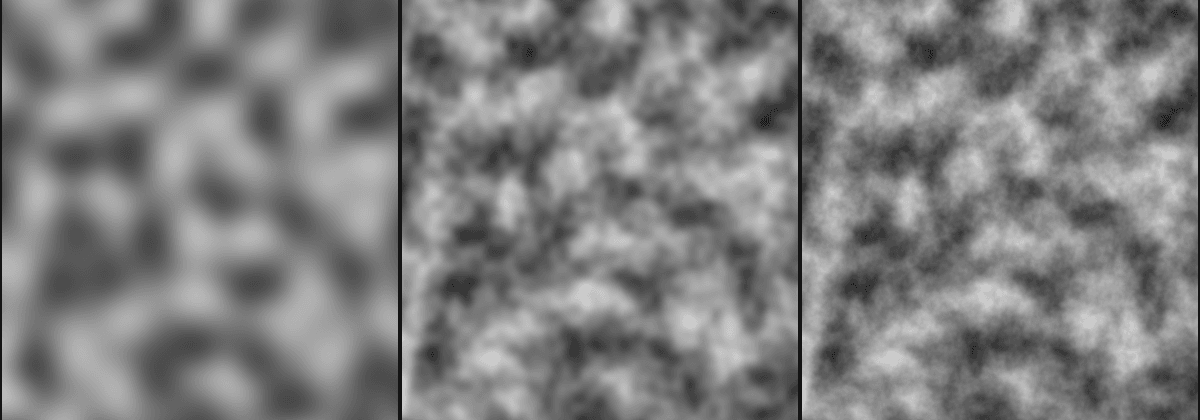
One octave gives smooth blobs. Three adds a layer of finer structure on top of the same large shapes. Five adds another, and the large shapes are still there underneath — each octave contributes half as much as the one before, so the overall composition never changes, only the detail.
Each pass is an octave, borrowed from music, where doubling frequency is exactly what an octave is. Four or five is usually enough before the additions fall below what a pixel can show.
Halving the amplitude each octave is the standard and looks natural; reducing it more slowly gives something rougher and more turbulent.
Where the Functions Come From
Noise implementations are fiddly and easy to get subtly wrong in ways that surface as visible grid artefacts. Install one rather than writing it — glsl-noise provides the standard simplex and Perlin variants in 2D, 3D and 4D. See Shader Modules and Reuse.
See Also
- Vertex and Fragment Shaders — displacing vertices and colouring pixels with these values
- Shader Modules and Reuse — installing noise instead of pasting it
- Shaders and the GPU — the built-in maths these build on
Resources
- Noise — The Book of Shaders, with live examples
- Fractal Brownian Motion — octaves and layering
- glsl-noise — simplex and Perlin noise as GLSL modules
Source: WebGL & GLSL — A Primer by Matt DesLauriers