Tooling - canvas-sketch Workflow
Why a generative art harness exists, the shape of a sketch, and how a running sketch becomes a file.
canvas-sketch is a harness for generative artwork. It owns the canvas, the animation loop, resizing and export, so a sketch is only the code that draws.
The machinery it replaces is identical every time and none of it is the work — creating a canvas, sizing it to the viewport, handling device pixel ratio, running a loop, getting a frame out as a file.
Where This Fits
The tooling layer, and the outermost one. It sits above the rendering engine and knows nothing about shaders; nothing else in these notes requires it.
Assumes nothing, but makes most sense once you have something worth exporting. Bundles the tooling in Shader Modules and Reuse already.
The Shape of a Sketch
A sketch is a function that sets things up and returns another function that draws. A complete one:
const canvasSketch = require('canvas-sketch');

const settings = {
  dimensions: [1024, 640]
};

const sketch = () => {
  const columns = 14;
  const rows = 9;

  return ({ context, width, height }) => {
    context.fillStyle = '#151515';
    context.fillRect(0, 0, width, height);

    const margin = width * 0.08;
    const stepX = (width - margin * 2) / (columns - 1);
    const stepY = (height - margin * 2) / (rows - 1);

    for (let x = 0; x < columns; x++) {
      for (let y = 0; y < rows; y++) {
        const u = x / (columns - 1);
        const v = y / (rows - 1);
        const radius = (0.1 + 0.9 * Math.abs(Math.sin(u * 3.0 + v * 2.0))) * stepX * 0.34;

        context.beginPath();
        context.arc(margin + x * stepX, margin + y * stepY, radius, 0, Math.PI * 2);
        context.fillStyle = `hsl(${170 + u * 60}, 55%, ${45 + v * 20}%)`;
        context.fill();
      }
    }
  };
};

canvasSketch(sketch, settings);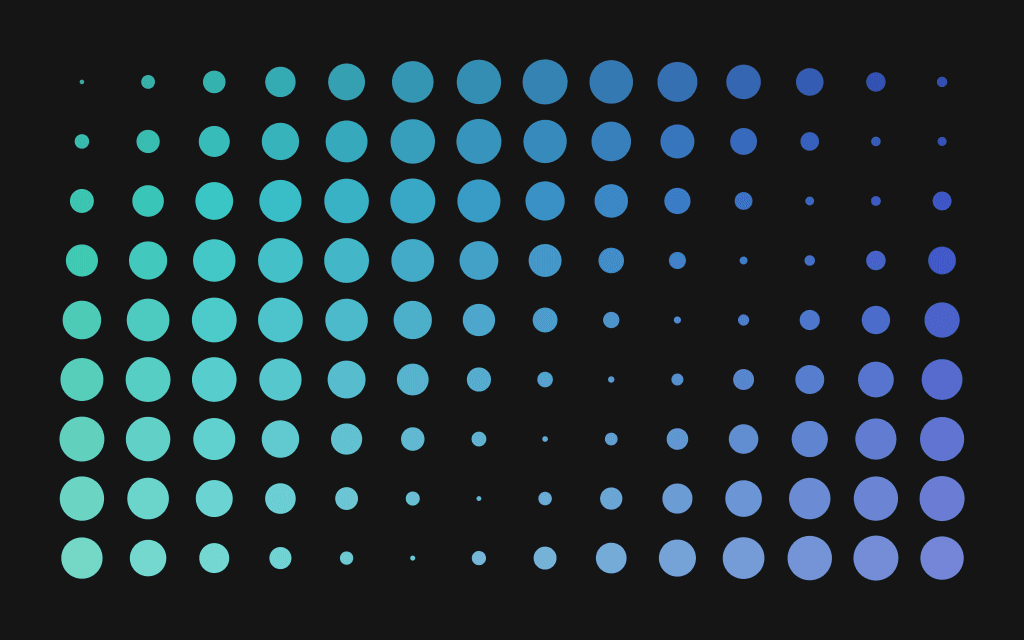
The outer function runs once, so anything expensive belongs there — geometry, assets, a renderer. The returned function runs per frame and receives what it needs as arguments.
The closure is doing real work. Everything created during setup stays in scope for the render function without being stored on an object or a module-level variable, so setup state and per-frame state are separated by the language rather than by convention.
settings describes the output rather than the content: dimensions, whether it animates, and whether the canvas is 2D or WebGL. Asking for a WebGL context is what makes three.js and shader work possible.
For non-trivial work the render function becomes one of several hooks — render to draw, resize to react to a changed viewport, unload to free GPU resources when the file hot-reloads. Without the last one, every save leaks another renderer.
Separating What You Draw from How It Gets Out
Note that nothing above mentions a window size. Every measurement derives from the width and height handed in, which is what lets the same sketch render to the screen, to a print-resolution PNG several thousand pixels square, or to a frame sequence for video, with no change to the drawing code.
A sketch that hardcodes pixel offsets is locked to the size it was developed at, and only reveals it when you try to print. The same discipline appears in shaders as UV coordinates running 0..1 — see Attributes, Uniforms and Varyings.
Getting the Work Out
Export is a keystroke while the sketch runs, not a build step. Cmd + S writes a single frame, Cmd + Shift + S starts and stops recording a sequence. The canvas needs focus, which is the usual first stumble.
Frame sequences write one image per frame. Nothing is compressed or lost, and the frames can be encoded later at any quality. This is the right choice for anything that matters.
Streaming encodes to MP4 or GIF during the recording via ffmpeg. One file, no second step, encoding settings chosen for you. Convenient while iterating.
Render larger than you publish and scale down during encoding. Downscaling averages several rendered pixels into each output pixel, which anti-aliases the result — lines come out cleaner than rendering at the target size directly.
Publishing to the web is a static bundle: sketch and dependencies compiled to an HTML and JavaScript pair, deployable anywhere.
Hot Reloading
The dev server reloads on save, and the loop is tight enough that tuning a number and seeing the result becomes continuous rather than deliberate. Shaders reload the same way, so a fragment shader can be edited against a running scene.
What breaks the flow is state that fails to reset between reloads, which is what the teardown hook prevents.
See Also
- Shader Modules and Reuse — glslify is wired into this toolchain already
- The Scene Graph — what goes inside the render function for 3D work
- WebGL and Shaders — where this sits in the stack
Resources
- canvas-sketch documentation
- Exporting Artwork — shortcuts, frame sequences and encoding
- WebGL, GLSL, Three.js and More — shader files and live shader coding
- canvas-sketch-util — randomness, maths and colour helpers
Source: WebGL & GLSL — A Primer by Matt DesLauriers