Rendering Engines - The Scene Graph
The tree of objects a rendering engine draws, and why shape, appearance and viewpoint are kept as separate things.
A scene graph is a tree of objects describing everything to be drawn. A rendering engine walks that tree once per frame, works out where each object ends up, and issues the drawing commands.
Where This Fits
The rendering engine layer. Everything named here is an invention of the engine rather than something WebGL provides — raw WebGL has buffers and draw calls, no scene and no camera. The vocabulary is three.js’s, though the same concepts appear in every engine.
Assumes Coordinates and Geometry. Leads to 3D Transformations.
The Scene
THREE.Scene is the root. Anything that should appear in the frame is added to it, or to something already in it.
It is a tree rather than a flat list because objects are built from parts, and parts should move with the whole. A robot arm has a forearm attached to an upper arm; rotating the upper arm should carry the forearm with it. In a tree that happens for free, since a child’s transform is applied on top of its parent’s.
Mesh: Geometry Plus Material
A mesh is a geometry paired with a material.
| Part | Answers | Example |
|---|---|---|
| Geometry | What shape is it? | A sphere’s vertices, faces and UVs |
| Material | What does it look like? | Matte red, reflective metal, a custom shader |
| Mesh | Both, positioned in the scene | A red sphere at (0, 1, 0) |
One geometry, three materials:
const geometry = new THREE.SphereGeometry(0.85, 48, 32);

const materials = [
  new THREE.MeshNormalMaterial(),
  new THREE.MeshBasicMaterial({ color: '#4ec9b0' }),
  new THREE.MeshBasicMaterial({ color: '#ffb454', wireframe: true })
];

materials.forEach((material, i) => {
  const mesh = new THREE.Mesh(geometry, material);
  mesh.position.x = (i - 1) * 2.1;
  scene.add(mesh);
});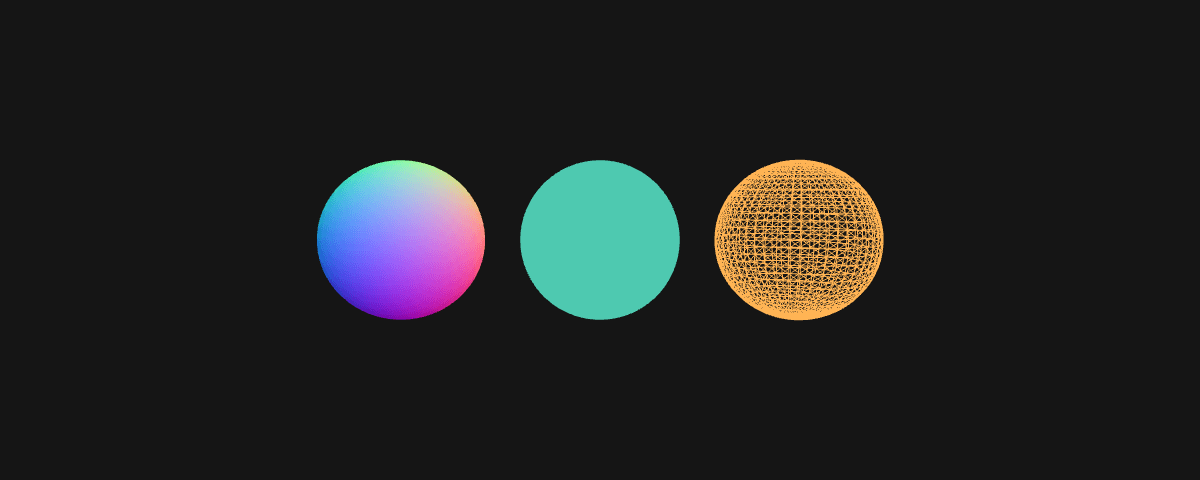
Three meshes, one set of vertex data. Keeping the two apart means the sphere is uploaded to the GPU once rather than three times — geometry is the expensive part, so sharing it is the easiest performance win available. The wireframe on the right is the same vertex data as the other two, drawn differently.
Materials
Built-in materials cover the usual surface behaviours: flat unlit colour, physically-based metal and roughness, a debug material that colours by surface normal. They exist so you do not write a lighting model from scratch every time.
The one that matters here is the shader material, where you supply the vertex and fragment programs yourself. In generative work that is often the first thing you reach for rather than a last resort, because the interesting behaviour lives in the shader rather than in the geometry. See Shaders and the GPU.
Camera
A camera contributes a viewpoint and a projection.
The viewpoint is position and orientation. A camera is an object in the tree like any other, so pointing it at something is just a transform.
The projection is how 3D space gets flattened onto a 2D screen. Perspective makes distant things smaller, as eyes and lenses do. Orthographic does not, so parallel lines stay parallel — used for technical drawing, isometric games, and plotter output where consistent scale matters more than realism.
Lights
Lights are objects in the tree that materials read when shading a surface. They differ in where the light comes from: ambient arrives evenly from everywhere, directional arrives in parallel rays as if from the sun, point radiates outwards from a position.
Whether a material responds to lights at all is a property of the material. An unlit material ignores every light in the scene, and a custom shader responds only if you write the maths to do so. Adding a light and seeing nothing change usually means the material was never listening.
The Renderer
The renderer holds the WebGL context and the canvas. Give it a scene and a camera and it produces one frame: traverse the tree, compute each object’s final transform, sort what needs sorting, issue the draw calls.
A frame is therefore a discrete event. Nothing is drawn continuously — a render loop calls the renderer over and over, and animation is changing something in the tree between two of those calls.
See Also
- Coordinates and Geometry — what a geometry actually contains
- 3D Transformations — how transforms travel down the tree
- Shaders and the GPU — writing a material yourself
Resources
- Scene — the three.js scene graph root
- three.js manual — longer-form explanations of these concepts
Source: WebGL & GLSL — A Primer by Matt DesLauriers