GLSL - Attributes, Uniforms and Varyings
The three ways data reaches a shader, how often each one changes, and why UV coordinates work.
A shader’s main function takes no arguments. Everything it works with arrives through variables declared outside it, and there are three kinds, distinguished by how often the value changes.
Once “how often does this change?” is the question you ask about every value in a shader, most of the rest follows.
Where This Fits
The GLSL layer. The three kinds are part of the language, but this is the one note that touches engine-specific behaviour, because what an engine declares on your behalf changes what you have to write.
Assumes Shaders and the GPU and pairs with Vertex and Fragment Shaders. Attributes come from the geometry in Coordinates and Geometry.
The Three Kinds
| Attribute | Uniform | Varying | |
|---|---|---|---|
| Changes | Per vertex | Per draw call | Per fragment |
| Comes from | The geometry | Your JavaScript | The vertex shader |
| Readable in | Vertex shader only | Both shaders | Fragment shader |
| Example | position, normal, uv | Time, colour, mouse position | Interpolated UV coordinate |
Attributes
An attribute is per-vertex data, stored in the geometry and handed to the vertex shader one vertex at a time. Each invocation sees a different value.
The usual ones are position, normal and UV, but a geometry can carry anything you attach — a per-vertex colour, a random seed, an age. That is the cheapest way to give every vertex its own behaviour without branching.
Attributes are readable in the vertex shader only. By the time the fragment shader runs there are no vertices, only fragments, so an attribute has nothing left to refer to.
Uniforms
A uniform is constant for an entire draw call. Every vertex and every fragment sees the same value, which is where the name comes from.
uniform float time;
uniform vec3 colour;
Uniforms are the connection between your JavaScript and your shader — elapsed time, a colour from the interface, the pointer position. A shader with no uniforms produces the same image forever, so animation is a uniform rewritten each frame and the shader run again.
Both stages can read uniforms.
Varyings
A varying is written by the vertex shader, read by the fragment shader, and interpolated on the way.
Three vertices, each carrying its own colour attribute, forwarded as a varying:
// vertex shader
attribute vec3 colour;
varying vec3 vColour;

void main () {
  vColour = colour;
  gl_Position = projectionMatrix * modelViewMatrix * vec4(position, 1.0);
}
// fragment shader
varying vec3 vColour;
void main () {
gl_FragColor = vec4(vColour, 1.0);
}With the geometry’s colour attribute set to red, green and blue at the three corners:
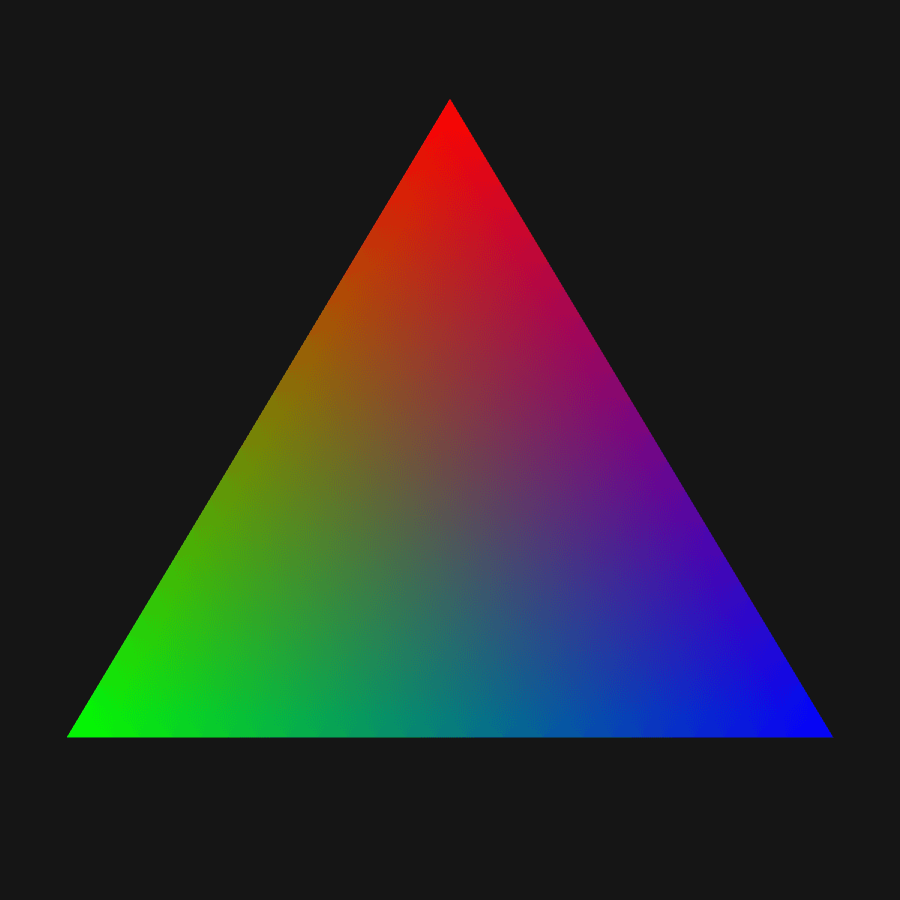
The vertex shader ran three times and set three values. Every fragment in between got its own, weighted by how close it sits to each corner. Nothing in the fragment shader computes a blend — the interpolation happened during rasterisation, before it ran.
That is where continuous variation across a surface comes from. Where both shaders declare the same varying the types must match, or the program fails to link.
The vertex shader may emit varyings the fragment shader never declares, though, and unused ones are stripped at link time rather than counted against the hardware’s varying budget. That is what lets a single pass-through vertex shader feed many different fragment shaders, each reading only the varyings it needs.
Where UV Coordinates Come From
A UV coordinate is a vec2 running (0, 0) to (1, 1) saying where on a surface a point sits, in the surface’s own terms rather than world space. It is an attribute assigned to each vertex when the shape is generated, then passed down as a varying exactly like the colour above.
Normalising to 0..1 is deliberate: a UV means the same thing on a two-metre plane and a two-pixel one, so shaders written against UVs work at any size and resolution.
The convention of prefixing varyings with v — vUv, vNormal, vPosition — is not required by the language, but it is near-universal and stops the varying colliding with the attribute it came from.
What the Engine Supplies
Raw WebGL means declaring all of these yourself, including the transform matrices and the precision qualifiers the language requires.
A rendering engine injects the standard ones. Three.js supplies position, normal and uv as attributes and projectionMatrix, modelViewMatrix and similar as uniforms, so a shader written for it uses them without declaring them — and redeclaring one is an error, because it is already there.
The tradeoff is that such shaders are not portable to another engine without editing. Engines usually offer a raw mode that injects nothing, for when you are bringing a shader in from elsewhere.
See Also
- Vertex and Fragment Shaders — the two stages these values travel between
- Coordinates and Geometry — where attributes are stored
- Shaders and the GPU — the types these declarations use
Resources
- Uniforms — The Book of Shaders on passing data in
- ShaderMaterial — which uniforms and attributes three.js injects
Source: WebGL & GLSL — A Primer by Matt DesLauriers